
Fibre Optics in a Flat: Correct ONT Placement, Internal Cabling and Upgrading to 2.5G/10G
Full-fibre broadband is no longer a luxury in the UK. By 2026, FTTP coverage has passed the majority of urban homes, and symmetric 1 Gbps tariffs are commonplace, with 2.5 Gbps and even 10 Gbps services available in selected cities. However, the real performance you experience at home depends not only on your ISP package, but on how the optical network terminal (ONT) is installed, how internal cabling is organised, and whether your home network is ready for multi-gigabit speeds. In this guide, I will explain how to position the ONT correctly, design reliable home wiring, and prepare your flat for 2.5G or 10G networking without unnecessary expense.
Where to Place the ONT in a Flat: Practical and Technical Considerations
The ONT is the device that converts the incoming fibre signal into Ethernet for your router. In most UK installations, the fibre enters the property through an external wall and terminates in a small fibre wall box, which connects to the ONT via a short optical patch lead. The location chosen during installation often becomes permanent, so it is worth planning in advance rather than accepting the first convenient spot near the front door.
From a technical standpoint, the ONT should be placed in a dry, well-ventilated area with stable mains power. Avoid cupboards without airflow, bathrooms, kitchens with steam exposure, or areas subject to temperature fluctuations. Although ONTs consume little power, they generate heat and require consistent cooling to maintain reliability over years of continuous operation.
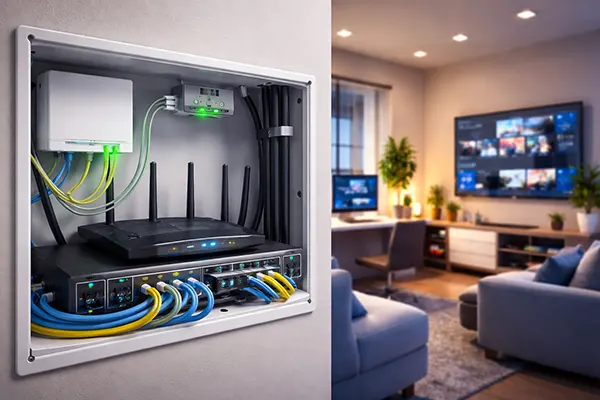
Equally important is network topology. Ideally, the ONT should be located close to where your primary router or firewall will sit. Placing the ONT in a hallway while your networking equipment is in a living room cabinet often results in visible patch cables or improvised wiring. In new renovations, it makes sense to allocate a small communications cupboard with power sockets, structured cabling terminations, and space for active equipment.
Power, Accessibility and Future Upgrades
An often overlooked factor is power resilience. In 2026, many UK ISPs provide digital voice services over fibre, meaning your landline depends on the ONT and router. If continuity is important, consider a small uninterruptible power supply (UPS) capable of running the ONT and router for at least 1–2 hours. Even a compact 400–600 VA unit is sufficient for low-power networking gear.
Accessibility matters for maintenance. Engineers may need to access the ONT for diagnostics or replacement. Avoid boxing it behind fixed panels or integrating it permanently into bespoke furniture. Leave enough slack in both the fibre patch lead and Ethernet cable to allow safe repositioning without straining connectors.
Finally, think ahead to multi-gigabit services. Some modern ONTs supplied in 2025–2026 include 2.5G Ethernet ports rather than standard 1G. If you are offered a choice, request hardware that supports at least 2.5G to avoid a forced replacement when upgrading your tariff.
Designing Internal Cabling: From Basic Ethernet to Structured Wiring
In many flats, Wi-Fi is relied upon exclusively. While modern Wi-Fi 6E and Wi-Fi 7 systems can deliver impressive speeds, wired backbones remain essential for stability and full multi-gigabit throughput. The foundation of a high-performance home network is structured Ethernet cabling, ideally installed during renovation.
For 1 Gbps and 2.5 Gbps connections, Cat6 cabling is generally sufficient up to 55 metres for 10G and 100 metres for 1G/2.5G. However, if walls are open and the cost difference is marginal, installing Cat6a is a forward-looking choice. Cat6a supports 10GBASE-T at 100 metres and offers improved shielding against interference, particularly in apartment buildings with dense electrical infrastructure.
Each key room should have at least one Ethernet outlet, with two recommended in living areas or home offices. All cables should terminate in a central patch panel near the ONT and router. This star topology simplifies troubleshooting and allows you to upgrade switches without rewiring the property.
Switches, Patch Panels and Clean Installation
A small unmanaged 2.5G switch is now affordable and makes sense if you have a multi-gigabit WAN connection. For example, connecting a 2.5G-capable ONT to a 2.5G router WAN port and distributing traffic through a 2.5G LAN switch ensures that high-speed local transfers between devices are not bottlenecked at 1G.
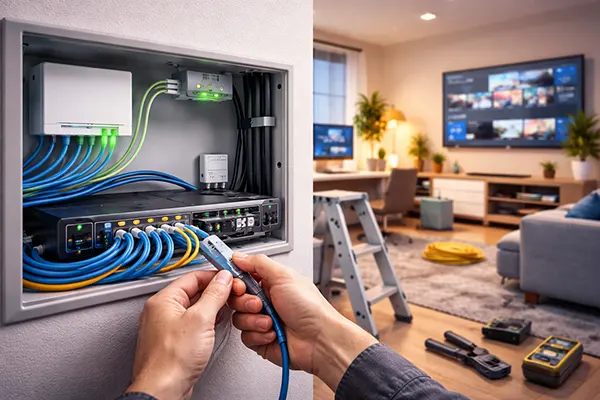
Use a proper patch panel and short factory-made patch leads rather than crimping plugs directly onto solid-core cable. This reduces failure rates and ensures compliance with structured cabling standards. Labelling each run clearly prevents confusion years later when changes are required.
Keep data cabling separated from mains power lines where possible, maintaining at least 200 mm distance or crossing at right angles. In flats with concrete walls, surface-mounted trunking can be installed neatly along skirting boards and painted to match the interior, providing a clean and serviceable solution.
Preparing for 2.5G and 10G: Hardware, Realistic Needs and Cost Efficiency
Before upgrading to 2.5G or 10G broadband, assess whether your internal network and devices can use the additional bandwidth. In 2026, most consumer laptops still ship with 1G Ethernet ports, though high-end motherboards increasingly include 2.5G as standard. True 10G interfaces remain more common in enthusiast desktops and NAS systems.
A typical path to 2.5G involves three elements: a compatible ONT or modem, a router with a 2.5G WAN port, and at least one 2.5G LAN port for high-performance devices. If you run a home server, NAS or frequently transfer large media files, 2.5G can reduce transfer times significantly without the cost and heat associated with full 10G setups.
Moving to 10G requires more careful planning. 10GBASE-T equipment consumes more power and generates more heat, and switches are still relatively expensive compared to 2.5G models. In many flats, a hybrid approach works best: 10G between a core switch and a NAS, with 2.5G to desktops and Wi-Fi access points.
When Multi-Gigabit Actually Makes Sense
For most households, 1 Gbps remains more than sufficient for streaming, gaming and remote work. The benefits of 2.5G or 10G become visible when multiple heavy users operate simultaneously, or when large datasets are stored locally. Video editors working with 4K or 8K footage, for example, can benefit from faster network storage access.
Another scenario is advanced Wi-Fi deployment. Wi-Fi 7 access points can exceed 1 Gbps real-world throughput under optimal conditions. Without a 2.5G uplink, the wired side becomes the limiting factor. Therefore, upgrading backbone links can unlock the potential of modern wireless standards.
Cost efficiency should guide decisions. There is little value in paying for a 10G internet plan if your internal wiring is Cat5e and your devices are limited to 1G. A staged upgrade—first structured cabling, then multi-gig switches, then higher ISP speeds—ensures each investment delivers measurable benefit.